Coraza-SPOA and OWASP CRS on HAProxy
Repositories
- Public repo available
Why I built this
HAProxy is still my preferred edge proxy. It’s fast, stable, and behaves predictably.
I wanted proper WAF protection, but I also wanted to understand how a WAF actually works under the hood. Not just “enable it and hope for the best.” I didn’t want a heavy, all-in-one stack or something that hides the logic behind too many layers.
This setup forces you to understand the flow: how requests move through HAProxy, how Coraza evaluates rules, and how decisions are applied. It’s not plug-and-play, but that’s part of the point. You see what is happening, and you stay in control.
So I built the stack around:
- HAProxy at the edge
- Coraza-SPOA as the WAF engine
I also looked at CrowdSec and BunkerWeb, but this combination gave me clearer visibility into what was blocked and why, and it was easier to tune when something needed adjustment.
May 2026 update: official HAProxy AWS-LC packages
The big change since the first version is that I no longer build HAProxy and AWS-LC from source by default.
HAProxy now provides official Community Performance Packages built with AWS-LC:
- Official downloads: https://www.haproxy.com/downloads
- Release announcement: https://www.haproxy.com/company/news/haproxy-technologies-announces-availability-of-haproxy-community-performance-packages-compiled-with-aws-lc
That changes the operational decision.
In January 2025, the source build made sense for my Oracle ARM edge node because the package path was not available in my environment. I wanted HAProxy 3.3, QUIC, and AWS-LC, and compiling both AWS-LC and HAProxy was the reliable way to get there.
In May 2026, that is no longer the right default. The haproxy-awslc package gives me the same practical target:
- HAProxy 3.3
- AWS-LC TLS runtime
- QUIC / HTTP/3 support
- distro package management
- a normal upgrade and rollback path
Current version in my test Oracle ARM deployment:
- HAProxy
3.3.10-0+ha33+ubuntu24.04u1 - Running SSL library:
AWS-LC 3.3.0 - Build flags include
USE_OPENSSL_AWSLC=1andUSE_QUIC=1 - Coraza-SPOA
v0.7.2 - OWASP CRS
v4.26.0
The source build was useful, but was operationnally harder:
- I had to manage
/usr/local/src/aws-lc,/opt/aws-lc, HAProxy source trees, and build markers. - Upgrades were manual.
So the new rule is simple:
- Use
haproxy-awslcfrom the HAProxy performance repository when the package exists for the target distro and architecture. - Keep source builds only as a fallback for unsupported platforms or lab experiments.
- Clean up old source build artifacts, but do not remove packaged runtime libraries.
Quick context:
- AWS-LC is Amazon’s crypto library with an OpenSSL-compatible API and strong TLS performance.
- QUIC is the UDP-based transport behind HTTP/3.
For a great deep dive on TLS stack choices and tradeoffs, I strongly recommend this HAProxy article: https://www.haproxy.com/blog/state-of-ssl-stacks
I still like understanding the full chain: TLS library choice, HTTP/3 behavior, logging, WAF decisions, and ban enforcement. I just do not want the production edge node to be a custom compiler pipeline when an official package now exists.
1. Install HAProxy 3.3 with AWS-LC and QUIC
On Ubuntu 24.04 ARM, I now use the HAProxy performance repository and install haproxy-awslc.
1
2
3
4
5
6
7
8
9
10
11
sudo apt-get install -y ca-certificates gnupg socat wget
sudo install -d -m 0755 /usr/share/keyrings
sudo wget -O /usr/share/keyrings/HAPROXY-key-community.asc \
  https://pks.haproxy.com/linux/community/RPM-GPG-KEY-HAProxy

echo "deb [arch=arm64 signed-by=/usr/share/keyrings/HAPROXY-key-community.asc] https://www.haproxy.com/download/haproxy/performance/ubuntu/ha33 noble main" \
  | sudo tee /etc/apt/sources.list.d/haproxy.list

sudo apt-get update
sudo apt-get install -y haproxy-awslc
haproxy -vv | grep -Ei 'HAProxy version|OPENSSL_AWSLC|QUIC|AWS-LC'
On my test Oracle ARM edge, that reports:
1
2
3
4
HAProxy version 3.3.10-0+ha33+ubuntu24.04u1
OPTIONS = USE_OPENSSL=1 USE_OPENSSL_AWSLC=1 ... USE_QUIC=1 ...
Built with SSL library version : OpenSSL 1.1.1 (compatible; AWS-LC 3.3.0)
Running on SSL library version : AWS-LC 3.3.0
If HAProxy is started by systemd as the haproxy user, QUIC on UDP/443 still needs the binary to keep the privileged bind capability:
1
2
3
sudo apt-get install -y libcap2-bin
sudo setcap cap_net_bind_service=+ep /usr/sbin/haproxy
sudo getcap /usr/sbin/haproxy
Without that, HAProxy can start but log this after a restart:
1
Permission error on QUIC socket binding for proxy front_webservers.
Also keep nbthread aligned with the actual CPU count. My current production Oracle edge has one CPU, so the HAProxy global section uses:
nbthread 1
If nbthread is too high, HAProxy warns that several threads are bound to the same CPU and performance can degrade.
The Ansible role now also removes legacy source build paths such as /usr/local/src/haproxy-* and old build-state markers. It intentionally refuses to clean /opt/aws-lc, because the packaged HAProxy AWS-LC runtime uses that path.
2. Install Coraza-SPOA
Coraza-SPOA is in Go. I install Go, build the binary, and run it as a dedicated system user.
Install Go (pick a current stable release from go.dev/dl/ and use the right architecture for your host):
1
2
3
4
5
6
wget https://go.dev/dl/go1.23.5.linux-arm64.tar.gz
sudo tar -C /usr/local -xzf go1.23.5.linux-arm64.tar.gz
export PATH=$PATH:/usr/local/go/bin
echo 'export GOPATH=$HOME/go' >> ~/.bashrc
source ~/.bashrc
go version
Build and install Coraza-SPOA:
1
2
3
4
5
6
7
sudo apt install git make gcc pkg-config wget unzip
git clone https://github.com/corazawaf/coraza-spoa.git
cd ./coraza-spoa
go run mage.go build

addgroup --quiet --system coraza-spoa
adduser --quiet --system --ingroup coraza-spoa --no-create-home --home /nonexistent --disabled-password coraza-spoa
Create directories, fetch CRS, and adjust config:
1
2
3
4
5
6
7
8
9
10
11
12
13
mkdir -p /etc/coraza-spoa
cd /etc/coraza-spoa
sudo wget https://github.com/coreruleset/coreruleset/archive/refs/tags/v4.25.0.zip

mkdir -p /var/log/coraza-spoa /var/log/coraza-spoa/audit
touch /var/log/coraza-spoa/server.log /var/log/coraza-spoa/error.log /var/log/coraza-spoa/audit.log /var/log/coraza-spoa/debug.log

cp -a ./build/coraza-spoa /usr/bin/coraza-spoa
chmod 750 /usr/bin/coraza-spoa

cp -a ./example/coraza-spoa.yaml /etc/coraza-spoa/config.yaml
sed -i 's/bind: 0.0.0.0:9000/bind: 127.0.0.1:9000/' /etc/coraza-spoa/config.yaml
sed -i 's|log_file:.*|log_file: /var/log/coraza-spoa/coraza-agent.log|' /etc/coraza-spoa/config.yaml
3. How Coraza works with HAProxy
Quick refresher:
- SPOE: Stream Processing Offload Engine (HAProxy side)
- SPOA: Stream Processing Offload Agent (Coraza side)
- SPOP: protocol between the two
Request flow:
- Request hits HAProxy.
- HAProxy sends request context to Coraza over SPOE/SPOP.
- Coraza evaluates rules (CRS + plugin rules + custom exclusions).
- Coraza returns a decision (allow / deny / redirect / drop).
- HAProxy enforces the decision.
Important point: Coraza does not replace HAProxy. HAProxy still controls traffic. Coraza is the WAF decision engine.
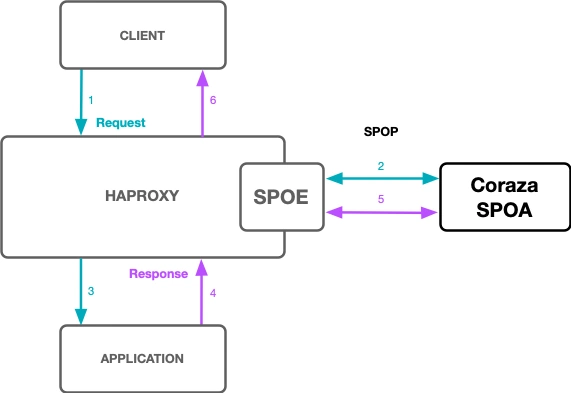
Main config files
/etc/haproxy/haproxy.cfg/etc/haproxy/coraza.cfg/etc/coraza-spoa/config.yaml/etc/coraza-spoa/coraza.conf
4. CRS rules quick primer
Coraza uses ModSecurity-style syntax:
1
SecRule VARIABLES "OPERATOR" "TRANSFORMATIONS,ACTIONS"
Example:
1
SecRule REQUEST_URI "@streq /index.php" "id:1,phase:1,t:lowercase,deny"
Phases are:
- Request headers
- Request body
- Response headers
- Response body
- Logging
Reference: ModSecurity Processing Phases Documentation
5. CRS plugins (Nextcloud example)
For Nextcloud, I use the official OWASP CRS Nextcloud plugin.
I also keep narrow, path-specific exclusions when needed. No broad bypasses.
6. QUIC pain points
6.1 Source build side effects
With source-built HAProxy, distro defaults may be missing:
haproxyuser/group- systemd unit
/etc/haproxy/errors/*.http- Linux capabilities for binding QUIC on UDP/443 as a non-root worker
So you can have a good binary and still fail at startup/validation.
6.2 Logging quality
If forwarded headers and Coraza real-IP handling are not aligned, logs can show loopback instead of real client IPs. That makes incident response much harder.
6.3 Correctly banning abusive QUIC clients
This part was trickier than expected.
At first, bans looked active in Fail2ban, but abusive HTTP/3 traffic could still show up. It is not just “TCP bad / UDP good”.
For bans to work reliably, several conditions must be met at the same time:
- HAProxy must log sufficient context for correlation (client IP, status code, request path, timing).
- Coraza decisions must be clearly and consistently recorded in the logs.
- Fail2ban filters must match the actual log format (journald vs file-based logs, correct regex).
- The ban action must block all transport paths used by clients (both TCP and UDP on port 443).
- nftables rules must be verified in the active chains or sets after Fail2ban reloads.
If one link is wrong, enforcement looks enabled but is incomplete.
Enforcement model
Attacker (HTTP/3 over UDP/443)
→ HAProxy frontend
→ Coraza deny / 403
→ Fail2ban catches repeated events
→ nftables bans source for TCP and UDP
Two important things:
- Fail2ban does not inspect QUIC packets directly, it reacts to log events.
- If logging is incomplete or delayed, enforcement will be delayed too.
Fail2ban pattern that worked
1
2
3
4
5
6
7
[coraza]
action = nftables[type=allports, protocol=tcp, name=coraza-tcp]
         nftables[type=allports, protocol=udp, name=coraza-udp]

[haproxy-rate]
action = nftables[type=allports, protocol=tcp, name=haproxy-rate-tcp]
         nftables[type=allports, protocol=udp, name=haproxy-rate-udp]
Then check three simple things:
- Make sure the jails are actually loaded and running:
- fail2ban-client status
- fail2ban-client status coraza
- fail2ban-client status haproxy-rate
Verify that nftables really has the ban rules in place (and that they apply to both TCP and UDP).
- Test it for real, from a banned IP, try hitting the server over HTTP/2 and HTTP/3 and confirm it’s blocked.
Also, be realistic about QUIC. Because it reuses connections and retries differently than TCP, a client might still look “active” for a short moment right after being banned. New connections should be dropped, but existing ones can linger briefly.
7. False positives and exclusion strategy
What stayed stable for me:
- Keep CRS enabled.
- Add official app plugin when available.
- Add small, narrow exclusions only for proven false positives.
- Keep scanner probes blocked (
/.ssh/id_rsa, generic probes, etc.).
For Nextcloud DAV, parser-related false positives can happen. Handle them with URI + method scoped exclusions.
8. Automation note
Everything is deployed with Ansible roles (WireGuard, Fail2ban, Coraza, ACME, HAProxy and post-checks) so the setup stays reproducible. Doing it by hand each time would be painful and easy to mess up.
The private deployment is now focused on Oracle edge hosts:
prod-edge-oci-01test-edge-oci-01
The HAProxy role also keeps the operational fixes in place:
haproxy_global_nbthread: 1for the current 1 CPU production edge VMcap_net_bind_service=+epon/usr/sbin/haproxywhen QUIC is enabledhaproxy-awslcfrom the official HAProxy performance repository- cleanup for old source-build directories without deleting the packaged AWS-LC runtime
This makes redeployments much cleaner. The old source build path spent several minutes compiling AWS-LC and HAProxy, and it left more moving parts behind. With the package path, the edge role can converge through normal APT operations and focus on config validation, certs, Coraza, Fail2ban, and service health.
9. Runtime verification
These are the checks I use after deploying or rebuilding:
1
2
3
4
5
systemctl status coraza-spoa haproxy fail2ban
ss -ltnp | egrep '(:80|:443|:9000)'
ss -lunp | egrep ':443'
haproxy -vv | egrep 'HAProxy version|OPENSSL_AWSLC|QUIC|AWS-LC'
fail2ban-client status coraza
For a quick local WAF test:
1
curl -H 'Host: xyz.domain.com' -D - http://127.0.0.1/.env
Expected result:
1
2
HTTP/1.1 403 Forbidden
waf-block: request
That confirms the request is reaching HAProxy, going through Coraza over SPOE, and being denied by the WAF path.
10. Final thoughts
The hard part is no longer compiling HAProxy with the right TLS library on ARM. The official AWS-LC performance package solved that part for my setup.
The harder work is now operational:
- keep HAProxy, Coraza, ACME, Fail2ban, and the host firewall aligned;
- verify HTTP/2 and HTTP/3 behavior;
- make sure WAF decisions are logged clearly enough for bans;
- avoid hiding production state inside one-off source builds.
That is a better place to spend time than maintaining a custom HAProxy compiler path on every edge rebuild.