Small local LLM Lab with an old mining GPU
One Card AI Inference Lab with a Used Mining GPU !
New update: Jump down to see what’s coming with a modded RTX 2080 Ti with 22 GB of VRAM!
I recently started coming across more people making videos about running local LLMs and doing infrastructure work around them. I also found the LocalLLaMA subreddit on Reddit, which made me want to try building a small local setup myself.
My goal was to put together a one-card GPU setup for AI inference experiments, benchmarking, and general GPU testing in my homelab.
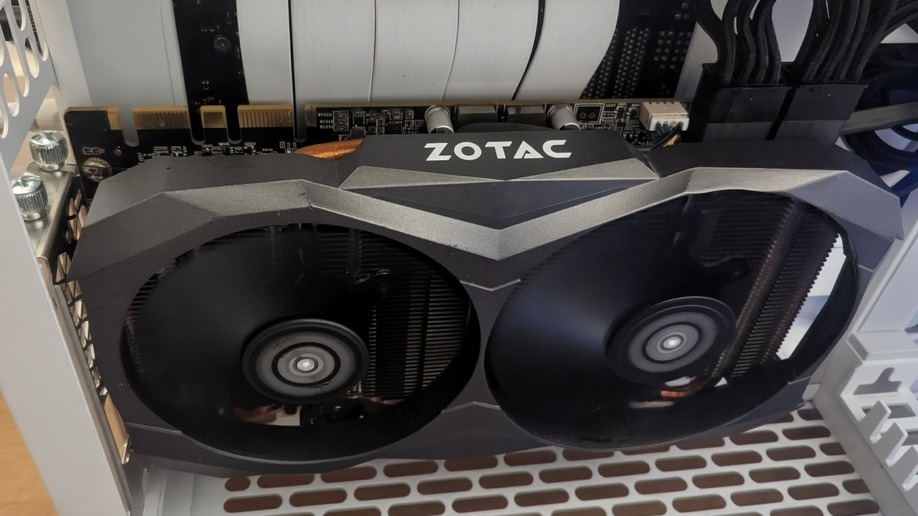
The card I bought is a Zotac P102-100. It is a mining GPU from the Pascal generation, equivalent to a GTX 1080 10 GB, with one very important detail: it has no physical display outputs.
No HDMI, no DisplayPort, nothing. That means it only really makes sense in a headless setup.
This is not a gaming GPU at all. Some people have tried and not failed, by using headless gaming setups with tools like Parsec for remote access and custom drivers. That is technically possible, and difficult, it’s not my use case.
I bought it to see whether it could be a cheap inference card for local AI.
1. Why this weird card
Well well well, price, challenge and VRAM !
I paid only 47 euros on eBay for a GPU with 10 GB of VRAM. For AI testing, that is an interesting amount of memory for the money.
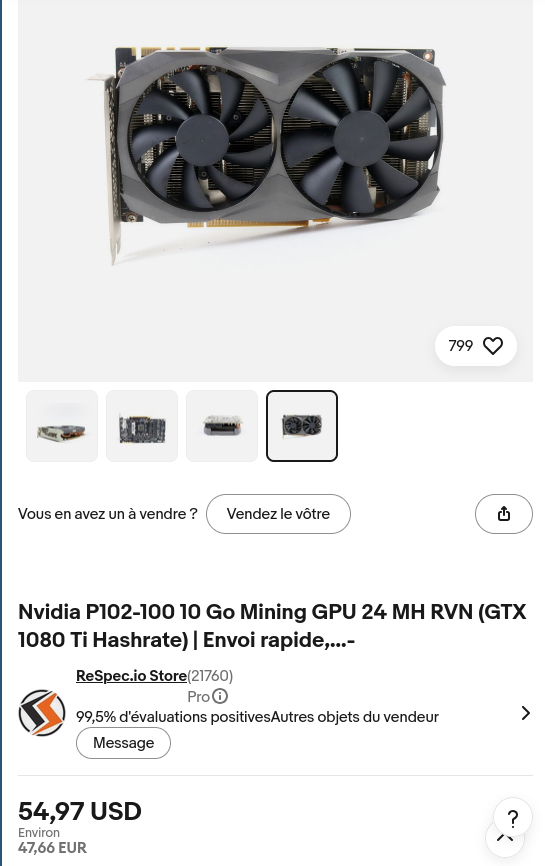
eBay listing photo of the Zotac P102-100 card
The card is listed here on TechPowerUp:
https://www.techpowerup.com/gpu-specs/zotac-p102-100.b5306
I also came across this Compelling Bytes video:
https://www.youtube.com/watch?v=6TnUwsxziD4&t=1s
The video is called “Dirt Cheap Local AI…”, and it gave me a useful reference point for the card. The setup in the video used a P102-100 with Qwen 2.5 7B Instruct, a 6-bit quant, a llama.cpp CUDA backend container, and a documentation RAG corpus with 186,000 chunks from nine projects. I haven’t reached the RAG or the quant tinkering yet just deployed on my second Proxmox node for a smoke test.
My goal was not to copy the exact RAG setup. I wanted to see if a cheap local LLM could have a practical use case in my own homelab, and whether it would be worth investing later in a bigger graphics card if the workflow proved useful, maintainable, and maybe fine-tunable.
There are obvious trade-offs. It is old, it is Pascal, it has no display output, and it was never meant to be a nice consumer desktop card.
For a headless VM or server, no display output is not really a problem.
For this setup, only access to the nvidia-smi mattered more than display output:
And whether an inference workload could actually land on the GPU instead of quietly falling back to CPU.
2. Test environment
This was not a full performance review. It was a compatibility and usability test for cheap local inference.
The smoke test setup is:
1
2
3
4
5
6
7
8
a Debian 13 Proxmox VM, 24 GB of RAM, 8 CPU
Kernel: 6.12.90+deb13.1-amd64

NVIDIA driver: 580.159.04 -> more later

Ollama version: 0.30.7
Model: qwen2.5-coder:7b
Quantization: Q4_K - Medium
I also tested the Debian packaged NVIDIA 550 driver path first, but that ended up being the main caveat of the experiment.
3. First goal, make Linux see it properly
Before testing Ollama or models, I needed to get the driver stack working.
The card shows up as a P102-100, but these mining cards are a little special. A normal NVIDIA driver install is not always enough, because the card needs a patched driver path to expose it properly for normal compute use.
So the basic checklist was:
1
2
3
lspci -nnk | grep -A4 -Ei 'nvidia'
lsmod | grep -E 'nvidia|nouveau'
nvidia-smi
Nouveau getting involved is also something to watch for. If Nouveau grabs the card first, the NVIDIA driver will usually fail or behave in a confusing way.
I had to blacklist the nouveau driver and switch to a dedicated patch for these cards just below.
4. Driver patching
For this card I used the NVIDIA patcher project:
The Linux instructions use a runfile patching workflow rather than Debian packages.
The workflow was:
1
2
3
4
./NVIDIA-Linux-x86_64-580.159.04.run --extract-only
./linux.sh
cd NVIDIA-Linux-x86_64-580.159.04
sudo ./nvidia-installer
The patcher modifies the NVIDIA driver binary before the installer builds and installs the kernel module.
This is the main maintenance downside compared with distro-packaged NVIDIA drivers. I like package-managed systems, and I don’t love runfile drivers. But for this specific card, the supported patching path mattered more than treating it like a standard consumer GPU.
I also tested the older Debian packaged NVIDIA driver path. It was cleaner from a system maintenance point of view, and nvidia-smi worked after patching, but Ollama was not happy with it for CUDA.
The log was pretty clear:
1
2
NVIDIA driver too old
required_driver="570 or newer"
With the old 550 driver, Ollama could still see the card, but it used the Vulkan backend instead of CUDA. Not what I wanted for the setup at all.
With the patched 580.159.04 driver, Ollama selected CUDA.
5. Ollama and Qwen Coder
The test was Ollama with a Qwen coder model.
I used:
1
ollama pull qwen2.5-coder:7b
This model is a good fit for a card like this because it is useful enough to test coding prompts, but small enough to fit comfortably in 10 GB of VRAM.
The test prompt was a small coding task:
1
Write a complete Python 3 program that reads an nginx access log from stdin and prints the top 10 client IP addresses by request count.
This was a sanity test rather than a controlled benchmark. The goal was to confirm that the model loaded, used CUDA, consumed VRAM, and kept the GPU busy during generation.
The checks were:
- Does Ollama detect the GPU
- Does VRAM usage increase
- Does GPU utilization increase
- Does the model finish without crashing
- Do logs show CUDA/NVIDIA usage instead of CPU only
6. nvtop
I also installed nvtop because it was a new tool I had to use to see how the graphics card was handling the benchmark.
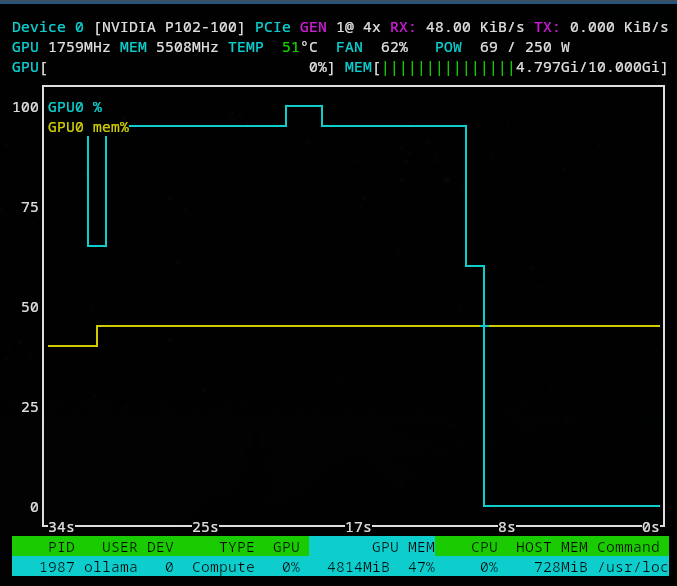
nvtop is nice and familiar like htop when you want to watch the card live while the model is running.
1
nvtop
It shows memory usage, utilization, power and the process using the GPU.
7. What worked
The best result without too much suspense was with the patched NVIDIA 580 driver.
Ollama detected the card as CUDA capable, loaded the model on the GPU, and the model ran with the card actually doing work.
nvidia-smi confirmed that the NVIDIA driver could see the card:
The Ollama logs were more important because they confirmed that the model runner selected CUDA0 rather than falling back to CPU or Vulkan:
1
journalctl -u ollama -n 200 --no-pager
The useful line was:
1
using device CUDA0 (NVIDIA P102-100)
That is the difference between “the driver exists” and “the workload is really using the card”.
8. Some numbers
With qwen2.5-coder:7b, the card used around 4.8 GB of VRAM during the run. The peak value I captured was 4817 MiB.
Some nvidia-smi values from the run:
1
2
3
4
5
Idle / no workload power seen: around 55 W
Peak power observed: around 259 W
Peak temperature observed: 61 C
Peak GPU utilization observed: 100 %
Peak VRAM used: 4817 MiB / 10240 MiB
The three test runs looked like this:
1
2
3
Run 1: 57.99s
Run 2: 24.66s
Run 3: 28.69s
The first run was slower because it had the cold-start and model-loading overhead. The second and third runs are more representative.
For my own baseline run, Ollama reported 35.65 tokens/s during generation. I also saw Ollama runner logs around 47 to 50 tokens/s in another measured run, so I treat these as early sanity-check numbers rather than a final benchmark.
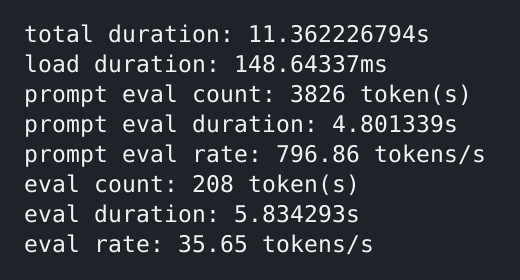
This is not comparable with modern inference hardware, but for a 47 euro card with 10 GB of VRAM, it is good enough for a homelab proof of concept.
I still want to do a cleaner benchmark pass later with a fixed prompt set and more controlled warm-up. This first test was mainly to confirm that the model loaded and used CUDA.
9. Driver maintenance
The main complexity is driver maintenance.
A normal Debian NVIDIA package install is much easier to maintain, but with this card it was not the most direct route. The runfile driver is harder to maintain because it sits outside the normal package manager flow.
Kernel updates also become something to pay attention to. DKMS can rebuild the module, but this is still less predictable than using a fully supported consumer GPU with a normal distro package.
The obvious limitation is that this is an old Pascal card. It is useful for testing small quantized models, but it should not be compared with modern RTX cards for performance, efficiency, or software support.
So the trade-off is clear:
- Cheap 10 GB card
- Good enough for one-card inference testing
- No display output, which is fine for server use
- More driver work than a normal GPU
- Old Pascal architecture
- Not a card I would recommend for a quiet plug-and-play desktop
10. Final thoughts
It is useful for testing, but limited by age, Pascal architecture, and driver maintenance. It gives me a cheap way to test GPU passthrough, NVIDIA drivers, Ollama, Qwen Coder, and monitoring tools without buying a much more expensive card.
I still have a better conscience using this card for experiments. It is basically e-waste hardware now, not useful for normal gaming, too old to be interesting for mining, awkward enough that most people would skip it.
For a homelab AI proof of concept though, that is exactly why it makes sense.
I will probably add updates to this post from time to time. There are still a lot of things I want to try, like using it as an agent from VS Code and maybe adding a web interface with something like Open WebUI.
I would only recommend this kind of card if you are comfortable with patched drivers, headless Linux setups, and occasional maintenance after kernel or driver updates.
For a plug-and-play AI box, a normal RTX card is the safer choice.
July 2026 update
I recently received an NVIDIA RTX 2080 Ti modded with 22 GB of VRAM instead of the original 11 GB. It was more complicated to obtain: I had to pay in cryptocurrency without any real guarantee that the card would arrive or work. Still, the card is here and working really well, for the moment :)
Unlike the P102-100, this card also has display outputs, which makes it much more usable everyday, its also 6x the price of the previous card and still not easy to obtain.
The first results are quite good. With qwen2.5-coder:7b, the RTX 2080 Ti averaged around 98 tokens/s. That is almost three times faster than the first P102-100 result, and roughly twice as fast as its better runs.
I also tried Devstral Small 2 24B Q5_K_M. It averaged around 31 tokens/s and used around 17.5 GB of VRAM, fit completely on the GPU vram. I replaced the old patched 580 driver with the latest original driver too.
Im really happy that the full 22 GB of VRAM is detected and work really well.
I hope that I will have enough time to continue this and do a full integration using the Pi coding agent, and also try another inference runtime.