Automating Proxmox with Terraform and Cloud-Init
Why I Built This Flow
I finally hit the point where the Proxmox UI was slowing me down more than it was helping. I needed everything as code so I could review changes, a lab that rebuilds the same every time, and boxes that are SSH-ready in minutes instead of half an hour.
This post is the workflow I use in my homelab. It is intentionally simple and repeatable: one base template, Terraform to clone it, and Cloud-Init to finish the bootstrapping.
The Flow (At a Glance)
- Build a Debian template with Cloud-Init installed.
- Clone it into a Terraform-friendly template (no Cloud-Init drive attached).
- Terraform clones the template and attaches Cloud-Init configuration.
- The VM boots and is ready for SSH.
That is it. All the clicks are now code.
Prerequisites
- A Proxmox node you can SSH into
- A VM template datastore (I use
vmdata) - A
snippetsdatastore (I uselocal) - Terraform installed locally
Step 1: Proxmox API User (Terraform)
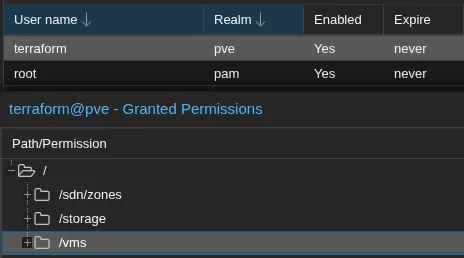
I use a dedicated Proxmox user and token instead of my personal account. That keeps access scoped and makes logs cleaner.
1
2
3
4
5
6
7
# Create API token for Terraform
pveum user add terraform@pve
sudo pveum role add Terraform -privs "Realm.AllocateUser, VM.PowerMgmt, VM.GuestAgent.Unrestricted, Sys.Console, Sys.Audit, Sys.AccessNetwork, VM.Config.Cloudinit, VM.Replicate, Pool.Allocate, SDN.Audit, Realm.Allocate, SDN.Use, Mapping.Modify, VM.Config.Memory, VM.GuestAgent.FileSystemMgmt, VM.Allocate, SDN.Allocate, VM.Console, VM.Clone, VM.Backup, Datastore.AllocateTemplate, VM.Snapshot, VM.Config.Network, Sys.Incoming, Sys.Modify, VM.Snapshot.Rollback, VM.Config.Disk, Datastore.Allocate, VM.Config.CPU, VM.Config.CDROM, Group.Allocate, Datastore.Audit, VM.Migrate, VM.GuestAgent.FileWrite, Mapping.Use, Datastore.AllocateSpace, Sys.Syslog, VM.Config.Options, Pool.Audit, User.Modify, VM.Config.HWType, VM.Audit, Sys.PowerMgmt, VM.GuestAgent.Audit, Mapping.Audit, VM.GuestAgent.FileRead, Permissions.Modify"
sudo pveum aclmod / -user terraform@pve -role Terraform
sudo pveum user token add terraform@pve provider --privsep=0

# Note the token - you'll need it for Terraform
If you are stricter about RBAC, trim the privileges down. I went wide to avoid surprises.
Step 2: Create a Cloud-Init Snippet
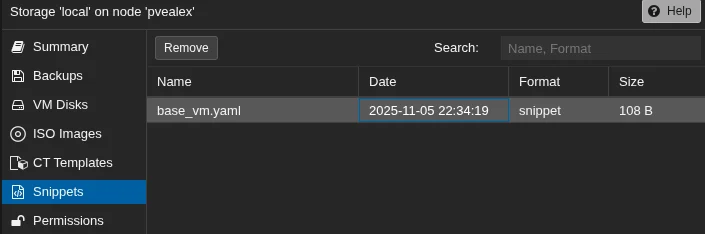
Snippets are small YAML files Proxmox can attach as Cloud-Init data. I keep a base snippet at:
/var/lib/vz/snippets/base_vm.yaml
1
2
3
4
5
6
7
#cloud-config
packages:
  - qemu-guest-agent
package_update: true
power_state:
  mode: reboot
  timeout: 30
This is intentionally minimal. I keep most customization in Terraform variables.
Step 3: Build the Debian Template
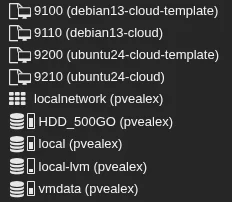
I use a short script to build two templates:
9110includes a Cloud-Init drive for direct Proxmox usage9100removes the Cloud-Init drive for Terraform cloning
1
2
3
4
5
6
7
8
9
10
11
12
13
14
15
16
17
18
19
20
21
22
23
24
25
26
27
28
29
30
31
32
33
34
35
36
37
38
39
40
41
42
43
#!/bin/bash
# Creates two Debian 13 templates:
# - 9110 with cloudinit drive (for direct Proxmox use)
# - 9100 without cloudinit drive (for Terraform)

if [ "$EUID" -ne 0 ]; then
    echo "Run as root"
    exit 1
fi

VMID_WITH=9110
VMID_WITHOUT=9100
MEMORY=2048
BRIDGE="vmbr2"
STORAGE="vmdata"
SSH_KEY="$HOME/.ssh/authorized_keys"

echo "Downloading Debian 13 image..."
wget -q --show-progress https://cloud.debian.org/images/cloud/trixie/latest/debian-13-generic-amd64.qcow2

# Create base template with cloudinit
qm create $VMID_WITH --name debian13-cloud --memory $MEMORY --net0 virtio,bridge=$BRIDGE
qm importdisk $VMID_WITH debian-13-generic-amd64.qcow2 $STORAGE -format qcow2
qm set $VMID_WITH --scsihw virtio-scsi-pci --scsi0 $STORAGE:vm-$VMID_WITH-disk-0
qm set $VMID_WITH --ide2 $STORAGE:cloudinit --boot c --bootdisk scsi0 --serial0 socket --vga serial0
qm resize $VMID_WITH scsi0 +20G
qm set $VMID_WITH --ipconfig0 ip=10.0.100.10/24,gw=10.0.100.1

if [ -f "$SSH_KEY" ]; then
    qm set $VMID_WITH --sshkey $SSH_KEY
fi

qm template $VMID_WITH
echo "Created template $VMID_WITH with cloudinit"

# Clone for Terraform (no cloudinit drive)
qm clone $VMID_WITH $VMID_WITHOUT --name debian13-cloud-template --full
qm set $VMID_WITHOUT --delete ide2
qm template $VMID_WITHOUT
echo "Created template $VMID_WITHOUT without cloudinit (for Terraform)"

rm debian-13-generic-amd64.qcow2
echo "Done"
If you need lots of different OS templates, consider Packer. For a handful, this script is enough.
Step 4: Terraform Provider Setup
main.tf:
1
2
3
4
5
6
7
8
9
10
11
12
13
14
15
16
17
18
19
terraform {
  required_version = ">= 1.0"
  required_providers {
    proxmox = {
      source  = "bpg/proxmox"
      version = "0.86"
    }
    local = {
      source  = "hashicorp/local"
      version = ">= 2.0"
    }
  }
}

provider "proxmox" {
  endpoint  = var.proxmox.endpoint
  api_token = var.proxmox.api_token
  insecure  = var.proxmox.insecure
}
I pin versions so upgrades are explicit.
Step 5: VM Resource Definition
This is the core: clone the template, attach Cloud-Init, set networking, and boot.
1
2
3
4
5
6
7
8
9
10
11
12
13
14
15
16
17
18
19
20
21
22
23
24
25
26
27
28
29
30
31
32
33
34
35
36
37
38
39
40
41
42
43
44
45
46
47
48
49
50
51
52
53
54
55
56
57
58
59
60
61
62
63
64
65
66
67
68
69
70
resource "proxmox_virtual_environment_vm" "vm" {
  for_each = { for vm in var.vms : vm.name => vm }

  name        = each.value.name
  node_name   = var.proxmox.node_name
  description = "Debian 13 VM"

  clone {
    vm_id        = var.proxmox.template_id
    full         = true
    datastore_id = var.datastore_id
    retries      = var.clone_retries
  }

  agent {
    enabled = true
    timeout = var.agent_timeout
  }

  cpu {
    cores = each.value.cpu_cores
  }

  memory {
    dedicated = each.value.memory_mb
  }

  disk {
    datastore_id = var.datastore_id
    size         = coalesce(each.value.disk_gb, var.disk_size_gb)
    interface    = var.disk_interface
    iothread     = true
    discard      = "on"
  }

  network_device {
    bridge  = each.value.bridge
    vlan_id = var.vlan_id
  }

  initialization {
    interface           = var.cloud_init_interface
    type                = "nocloud"
    vendor_data_file_id = var.vendor_data_file_id

    user_account {
      username = var.cloud_init_username
      password = var.cloud_init_password != "" ? var.cloud_init_password : null
      keys     = [trimspace(data.local_file.ssh_pub.content)]
    }

    ip_config {
      ipv4 {
        address = each.value.ip_address
        gateway = split("/", each.value.ip_address)[0] != each.value.ip_address ? cidrhost(each.value.ip_address, 1) : null
      }
    }

    dns {
      servers = var.dns_servers
    }
  }

  lifecycle {
    ignore_changes = [initialization["user_account"]]
  }

  started = true
  tags    = concat(var.tags, ["debian13"])
}
Notes:
vendor_data_file_idis the Proxmox file ID for a snippet (see Step 7 for an example).cloud_init_interfaceis the OS interface name Cloud-Init configures. On most Proxmox Debian images this isens18, but some images still useeth0.- The gateway logic assumes the first host in the subnet (for
10.0.100.50/24it becomes10.0.100.1). If your gateway is different, pass it explicitly in your per-VM config and use it directly.
Step 6: Key Variables
Proxmox connection:
proxmox.endpoint:https://proxmox.example.com:8006/proxmox.api_token:user@realm!token=secretproxmox.insecure:truefor self-signed certsproxmox.node_name: target Proxmox node
Cloud-Init:
cloud_init_username: default user to createcloud_init_password: optional password (I usually leave it empty)vendor_data_file_id: snippet file ID (for examplelocal:snippets/base_vm.yaml)dns_servers: DNS servers for the VM
VM list:
vms: array of per-VM configs (name, cpu, memory, IP, bridge)
Step 7: Variables + Outputs (Minimal Working Example)
These snippets make the examples above runnable without guesswork. Replace the placeholders to match your lab.
variables.tf:
1
2
3
4
5
6
7
8
9
10
11
12
13
14
15
16
17
18
19
20
21
22
23
24
25
26
27
28
29
30
31
32
33
34
35
36
37
38
39
40
41
42
43
44
45
46
47
48
49
50
51
52
53
54
55
56
57
58
59
60
61
62
63
64
65
66
67
68
69
70
71
72
73
74
75
76
77
78
79
variable "proxmox" {
  type = object({
    endpoint    = string
    api_token   = string
    insecure    = bool
    node_name   = string
    template_id = number
  })
}

variable "datastore_id" {
  type    = string
  default = "vmdata"
}

variable "clone_retries" {
  type    = number
  default = 3
}

variable "agent_timeout" {
  type    = number
  default = 60
}

variable "disk_size_gb" {
  type    = number
  default = 20
}

variable "disk_interface" {
  type    = string
  default = "scsi0"
}

variable "vlan_id" {
  type    = number
  default = null
}

variable "tags" {
  type    = list(string)
  default = []
}

variable "cloud_init_interface" {
  type    = string
  default = "ens18"
}

variable "dns_servers" {
  type    = list(string)
  default = ["10.0.100.1"]
}

variable "cloud_init_username" {
  type    = string
  default = "alex"
}

variable "cloud_init_password" {
  type    = string
  default = ""
}

variable "vendor_data_file_id" {
  type = string
}

variable "vms" {
  type = list(object({
    name       = string
    cpu_cores  = number
    memory_mb  = number
    disk_gb    = optional(number)
    ip_address = string
    bridge     = string
  }))
}
terraform.tfvars:
1
2
3
4
5
6
7
8
9
10
11
12
13
14
15
16
17
18
19
20
21
22
23
24
proxmox = {
  endpoint    = "https://proxmox.example.com:8006/"
  api_token   = "terraform@pve!provider=YOUR_TOKEN"
  insecure    = true
  node_name   = "pve01"
  template_id = 9100
}

datastore_id         = "vmdata"
cloud_init_interface = "ens18"
dns_servers          = ["10.0.100.1"]
cloud_init_username  = "alex"
vendor_data_file_id  = "local:snippets/base_vm.yaml"

vms = [
  {
    name       = "debian13-01"
    cpu_cores  = 2
    memory_mb  = 2048
    disk_gb    = 20
    ip_address = "10.0.100.20/24"
    bridge     = "vmbr0"
  }
]
outputs.tf:
1
2
3
4
5
6
output "ssh_commands" {
  value = [
    for vm in var.vms :
    "ssh ${var.cloud_init_username}@${split(\"/\", vm.ip_address)[0]}"
  ]
}
data source for your SSH public key (referenced in the VM resource):
1
2
3
data "local_file" "ssh_pub" {
  filename = pathexpand("~/.ssh/id_ed25519.pub")
}
Notes:
vmdata,local,vmbr2, andvmbr0are lab-specific names. Use whatever your Proxmox storage and bridge names are.vendor_data_file_idexpects the Proxmox snippet ID instorage:snippets/file.yamlform. If you upload snippets with Terraform, use the.idfromproxmox_virtual_environment_file.
Daily Operations
Deploy:
1
2
3
4
terraform init
terraform plan
terraform apply
terraform output ssh_commands
Note: -target is useful for one-off changes, but do not make it your default. It can skip dependencies and hide drift. Once you are comfortable, a normal terraform apply is safer.
Inspect:
1
2
3
4
5
terraform show
terraform state list
terraform state show proxmox_virtual_environment_vm.vm["debian13-01"]

pvesh get /nodes/pve01/qemu --output-format json | jq
Common Patterns I Use
Quick Dev/Test Fleet
1
2
3
4
5
6
7
8
9
10
11
12
13
14
locals {
  dev_vms = [
    for i in range(1, 6) : {
      name       = "dev-${format("%02d", i)}"
      cpu_cores  = 2
      memory_mb  = 2048
      disk_gb    = 20
      ip_address = "10.0.100.${20 + i}/24"
      bridge     = "vmbr0"
    }
  ]
}

vms = local.dev_vms
Kubernetes Cluster
1
2
3
4
5
6
7
8
9
10
11
12
13
14
15
16
17
18
vms = concat(
  [for i in range(1, 4) : {
    name       = "k8s-master-${format("%02d", i)}"
    cpu_cores  = 4
    memory_mb  = 8192
    disk_gb    = 50
    ip_address = "10.0.100.${10 + i}/24"
    bridge     = "vmbr0"
  }],
  [for i in range(1, 6) : {
    name       = "k8s-worker-${format("%02d", i)}"
    cpu_cores  = 8
    memory_mb  = 16384
    disk_gb    = 100
    ip_address = "10.0.100.${20 + i}/24"
    bridge     = "vmbr0"
  }]
)
SSD Optimization
Enable TRIM in Terraform:
1
2
3
4
disk {
  discard = "on"
  ssd     = true
}
And schedule fstrim with Cloud-Init:
1
2
3
#cloud-config
runcmd:
  - echo "0 2 * * 0 root /usr/sbin/fstrim -av" >> /etc/crontab
Security Notes
- Use a dedicated Proxmox user and API token.
- Never commit tokens or passwords.
- Disable root SSH login in your template.
- Update the template before cloning so new VMs are patched on first boot.
Cloud-Init and VyOS (Advanced)
VyOS does not support standard Cloud-Init keys like users or packages. It only accepts:
vyos_config_commandswrite_files
Example snippet:
1
2
3
4
5
6
7
8
9
10
11
12
#cloud-config
vyos_config_commands:
  - set system host-name 'vyos-router'
  - set system time-zone 'UTC'
  - set system login user ansible authentication public-keys key-01 key 'AAAAB3NzaC...'
  - set system login user ansible authentication public-keys key-01 type 'ssh-rsa'
  - set interfaces ethernet eth0 address '192.168.1.1/24'
  - set interfaces ethernet eth0 description 'WAN'
  - set protocols static route 0.0.0.0/0 next-hop '192.168.1.254'
  - set service ssh port '22'
  - commit
  - save
Upload Snippets with Terraform
Instead of manually placing snippet files on the Proxmox host, you can upload them with Terraform:
1
2
3
4
5
6
7
8
9
10
11
12
13
14
15
16
17
resource "proxmox_virtual_environment_file" "vyos_userdata" {
  for_each     = { for vm in var.vyos_vms : vm.name => vm }
  datastore_id = "local"
  node_name    = "pve01"
  content_type = "snippets"

  source_raw {
    file_name = "cloud-init-${each.key}.yml"
    data = templatefile("${path.module}/cloud-init-vyos.tpl.yml", {
      hostname    = each.value.hostname
      wan_ip      = each.value.wan_ip
      wan_gateway = each.value.wan_gateway
      timezone    = var.timezone
      ssh_keys    = var.ssh_keys
    })
  }
}
Then reference the snippet in your VM resource:
1
2
3
4
5
6
7
8
9
10
11
12
13
14
15
16
17
resource "proxmox_virtual_environment_vm" "vyos" {
  for_each = { for vm in var.vyos_vms : vm.name => vm }

  name      = each.value.name
  node_name = var.proxmox.node_name

  clone {
    vm_id = var.vyos_template_id
    full  = true
  }

  initialization {
    type              = "nocloud"
    datastore_id      = "local"
    user_data_file_id = proxmox_virtual_environment_file.vyos_userdata[each.key].id
  }
}
For a complete example with VyOS deployment and zone-based firewall configuration, additional examples are available.
Troubleshooting Checklist
1
2
3
4
5
6
7
# Test Proxmox API reachability
curl -k -H "Authorization: PVEAPIToken=terraform@pve!terraform=your-token" \
  https://proxmox.example.com:8006/api2/json/nodes

# Cloud-Init logs inside a VM
sudo cat /var/log/cloud-init.log
sudo cloud-init status --long
If those pass, the usual culprit is a typo in variables or a missing snippet reference. A fresh terraform plan usually makes it obvious.