Git cheatsheet
Use cases
1) I changed stuff but what ? log view diff
1
2
3
git status
git diff
git diff --staged
2) I want to commit only part of my changes
Use: you fixed 2 things but want 2 separate commits
1
git add -p
3) I staged the wrong file
Use: you did git add . too fast
1
git restore --staged file
4) I want to throw away local edits
Use: you broke something and want to go back
1
git restore file
5) My last commit is wrong (message or content)
Use: forgot a file, bad commit message (before pushing)
1
2
git add <file>
git commit --amend
6) Remote has new commits, I want clean history
Use: you and others push to the same branch, you have also commits
1
2
git fetch
git log --oneline --graph --decorate --all
then
1
git rebase #Puts your local commits on top of the updated remote (rewrites commit IDs).
or
1
git merge  #Combines the two histories with a merge commit if diverged.
7) Rebase got conflicts, how do I finish or cancel?
Use: during pull –rebase
1
2
3
4
git add <fixed-files>
git rebase --continue
# or cancel:
git rebase --abort
8) I need to pull, but I’m mid-work and not ready to commit
Use: you have modified stuff but didnt commit or didnt want to commit
1
2
3
git stash
git pull --rebase
git stash pop
9) I already pushed a bad commit, undo safely
Use: shared branch, teammate already pulled
1
git revert <commit>
10) I want to undo local commits (if not pushed)
Use: clean up your local history
1
2
git reset HEAD~1        # keep changes (unstaged)
git reset --hard HEAD~1 # delete changes (danger)
My others alias in .bashrc confs
1
2
3
4
5
6
7
alias gs='git status'
alias g='git '

lg() {
    [ -d .git ] || { echo "Not a git repo"; return; }
    git add . && git commit -m "$*" && git push
}
Recommended VScodium extension
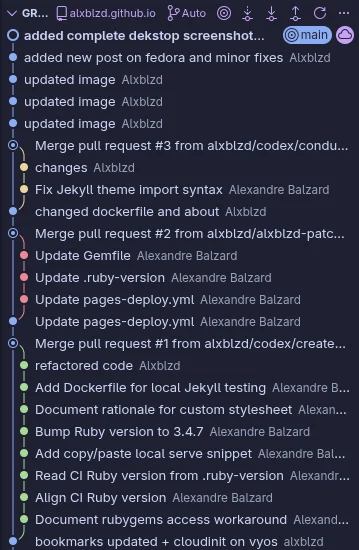
Use git graph from mhutchie used to view a Git Graph of repos, yo ucan even perform Git actions from the graph.
then :
1
Ctrl + shift + g
Here is an exmaple with commits and merge of branch
My ~/.gitconfig (starter)
Use: personalize identity, aliases, editor, and quality-of-life defaults
1
2
3
4
5
6
7
8
9
10
11
12
13
14
15
16
17
18
19
20
21
22
23
24
25
26
27
28
29
30
31
32
33
[user]
    name = Alxblzd
    email = 69093161+alxblzd@users.noreply.github.com

[core]
    editor = vi
    excludesfile = ~/.gitignoregbl  # Global ignore file

[color]
    ui = auto

[alias]
    st = status
    ci = commit
    co = checkout
    br = branch
    lg = log --oneline --graph --decorate --all
    df = diff
    hist = log --oneline --decorate --graph --all --date=short
    unstage = restore --staged
    amend = commit --amend --no-edit

[merge]
    tool = vimdiff  # Or meld if you prefer

[push]
    default = simple

[credential]
    helper = cache --timeout=3600  # Optional, secure credential caching

[rebase]
    autoStash = true
Keywords
- repo: the project + history
- commit: saved snapshot
- working tree: your edited files
- staging (index): what will go into the next commit
- HEAD: where you are now
- branch: movable label to a commit (main, dev)
- remote: server copy (origin)
- fetch: download remote info, don’t change files
- pull: fetch + integrate (merge or rebase)
- merge: combine histories (may create merge commit)
- rebase: replay your commits on top of another base (rewrites commit IDs)
- conflict: Git can’t auto-merge a file
- stash: temporarily hide uncommitted work
- revert: undo via a new commit (safe after push)
- reset: move branch pointer back (rewrites history; be careful)